By Vinova Systems Practice · 15-minute read
Every security dashboard shows a reassuring green tick. Antivirus: active. Patch level: three months behind. Nobody looked at the second line. An executive’s laptop, working from an overseas hotel, has missed three months of operating system updates and leaked corporate session tokens through an unmonitored browser process. By the time the first alert reaches your team, the attacker has already moved into Active Directory and across your regional branches.
Quick Answer: Remote Monitoring and Management (RMM) installs a lightweight agent on every endpoint to stream health and security telemetry continuously, automate operating system patching and run approved fixes remotely. For Singapore businesses, a well-run RMM practice shrinks the gap between a patch release and a patched fleet, gives you the audit trail that Monetary Authority of Singapore (MAS) and Personal Data Protection Act (PDPA) obligations call for, and needs its own hardening, because the tool holds the keys to every machine it manages.
Table of Contents
Key Takeaways
- Continuous Telemetry Replaces Blind Polling: Periodic network sweeps miss hybrid workers. A lightweight agent streaming event logs and process hashes can flag a privilege escalation within seconds, wherever the laptop is.
- Patch Governance Needs Staged Rings: Automatic patching with no validation breaks production systems. A good RMM practice uses canary and pilot rings with automated rollback gates.
- The RMM Agent Is a High-Value Attack Surface: The console and the agent run with the highest privileges on your network, so they need hardware-backed multi-factor authentication (MFA), short-lived sessions and cryptographically signed scripts.
- Monitoring Has Privacy Limits: Machine health telemetry is routine. Telemetry tied to a named employee is personal data under the PDPA, and intrusive tools such as keystroke logging are hard to justify.
1. The Fleet Visibility Gap: Why Reactive Monitoring Fails at Scale
Unmonitored endpoints build up operational and security debt silently.
It is easy to assume that active antivirus means a secure fleet. That assumption collapses on the one night it matters. Traditional network management relied on a physical perimeter: workstations stayed in the office, authenticated against on-premise domain controllers and answered local Simple Network Management Protocol (SNMP) polling. In a modern Singapore business that model is obsolete:
1. The Distributed Workforce: Employees connect from home fiber, co-working hubs, airport Wi-Fi and client offices, often without a persistent corporate Virtual Private Network (VPN) tunnel.
2. The Shadow Endpoint Blind Spot: Unmanaged mobile devices, contractor machines and unpatched branch file servers sit outside central IT visibility.
3. The Lag of Periodic Scanning: A vulnerability scanner that runs monthly gives you an outdated snapshot. If a critical vulnerability is disclosed two days into the cycle, the window stays open for another 28 days.
| Dimension | Periodic and reactive IT | Continuous RMM |
|---|---|---|
| Visibility | Monthly scans and manual inventory audits | Process hashes and input/output rates streamed from every agent |
| Fault reporting | Users raise tickets after machines crash | Self-healing scripts triggered on anomalies |
| Off-network coverage | None once a laptop leaves the office LAN | Outbound-only mutual TLS tunnels that work on any network |
The Rule: If an endpoint takes more than sixty seconds to report an anomalous privilege escalation, your monitoring is forensic, not preventative.
Remote monitoring and management closes the gap by moving observability from network hardware to the endpoint operating system itself. It tracks performance counters, running processes, service states and patch levels in real time, so engineers remove blind spots before technical debt turns into downtime.
2. Architectural Anatomy of Modern RMM: Agents, Telemetry and Automation
RMM architecture balances continuous telemetry against the computing overhead on each endpoint.
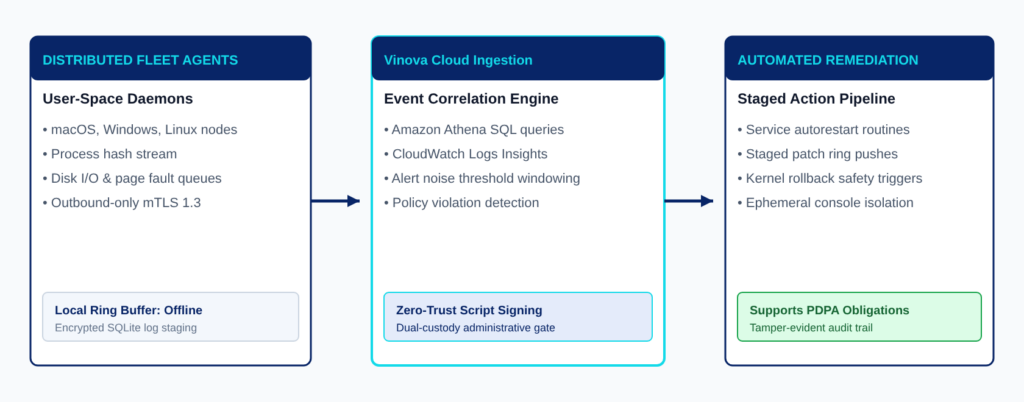
A poorly built monitoring agent adds latency, eats local Central Processing Unit (CPU) cycles and crashes user applications, so it pays to understand the mechanics before you deploy one. Modern remote monitoring and management platforms split the work across three tiers.
2.1 The Endpoint Telemetry Agent: RMM Daemon Architecture
The endpoint agent is a lightweight background daemon that runs in user space, for example as a Windows Service, a macOS launchd daemon or a Linux systemd unit.
- User Space Isolation: Modern daemons avoid fragile kernel-level drivers, which can cause blue screens or kernel panics during operating system updates. They reach system resources through verified operating system Application Programming Interfaces (APIs) such as Win32, Windows Management Instrumentation (WMI) and POSIX system calls.
- Outbound-Only Mutual TLS Communication: The agent never opens an inbound listening port, which removes a local attack vector. All traffic uses outbound mutual Transport Layer Security (mTLS) over port 443, authenticated by a unique X.509 device certificate.
- Local Ring Buffering: If an endpoint drops offline, telemetry is staged in an encrypted local buffer (SQLite or LevelDB, for example). When connectivity returns, the buffer flushes in order, so the audit history has no gap.
2.2 Automated Script Execution and Configuration Enforcement
RMM does not merely observe. It enforces an operational baseline through deterministic routines. When an unauthorized change occurs, such as a security service being disabled, a local firewall port opening or a certificate expiring, the agent starts remediation straight away:
- Self-Healing Routines: If a line-of-business database service or a security agent halts unexpectedly, the local daemon detects the state violation within seconds and restarts it, with no engineer on the line.
- Deterministic Configuration Management: Scripts in PowerShell, Python or Bash run in controlled sandboxes and check their exit codes, so machines stay inside the corporate security baseline.
2.3 Telemetry Ingestion and Noise Filtering
Streaming thousands of metrics from hundreds of laptops creates alert fatigue fast. If the service desk gets an email every time a workstation CPU touches 90% for three seconds, engineers learn to ignore the alerts, including the one that matters.
Enterprise RMM engines handle this with cloud data pipelines:
- Threshold Windowing: An alert fires only when an anomaly persists beyond a baseline window, for example CPU above 90% for eight consecutive minutes.
- Event Correlation: When an edge switch goes offline, the platform suppresses the downstream workstation disconnect alerts and raises one correlated network incident.
3. Automated Patch Management in Singapore: Closing the Vulnerability Window
Flawed patching sits behind many operational breaches.
Vendors release hundreds of security and driver updates each month. Without automated patch management, organizations fall into a two-sided trap: delay updates and stay exposed to known exploits, or deploy blindly and break business applications.
3.1 Staged Deployment Rings: Canary, Pilot, Broad Rollout
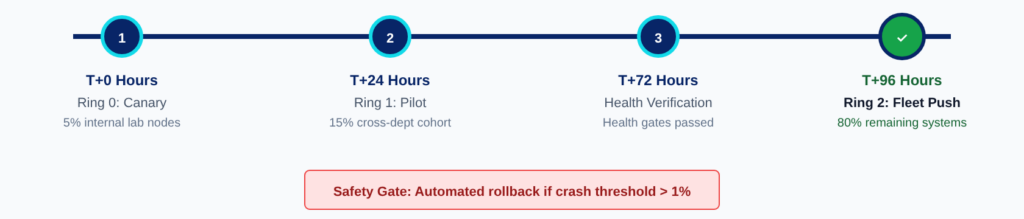
Enterprise patch governance never pushes an update to the whole fleet at once. It runs three rings in sequence:
| Ring | Share of fleet | Window | What it validates |
|---|---|---|---|
| Ring 0: Canary | About 5%: internal IT systems and lab machines | T+0 to T+24 hours | Boot integrity, driver stability and basic network connectivity |
| Ring 1: Pilot | About 15%: a cross-departmental sample of non-critical users | T+24 to T+72 hours | Compatibility with ERP clients, accounting engines and peripherals |
| Ring 2: Broad rollout | The remaining 80% | T+72 to T+96 hours, in off-hours maintenance windows | Fleet-wide stability, watched by automated health gates with instant rollback hooks |
The percentages and windows are a starting design. Tune them to your fleet and your risk appetite.
3.2 Automated Health Gates and Rollback Triggers
Suppose a Ring 1 update causes memory leaks, application crashes or driver panics. The agents report the anomaly, the RMM engine suspends the rollout automatically, and an uninstall routine (WUSA /uninstall or a package rollback) restores the machine. The broken update never reaches the other 80% of your fleet.
3.3 Sizing Fleet Patch Exposure
To compare patching approaches, security architects can calculate a cumulative exposure score for the fleet:
Where:
- CVSSk is the Common Vulnerability Scoring System base score of unpatched vulnerability k, from 0.0 to 10.0.
- NUnpatched,k(t) is the number of endpoints still missing patch k at time t.
- ΔtExposure,k is the number of days vulnerability k stays open on the fleet after disclosure.
Manual or ad-hoc patch cycles leave the exposure window open far longer than a staged pipeline does. A staged RMM pipeline brings the Mean Time to Remediate (MTTR) down to the length of its rings:
| Patch approach | Typical exposure window |
|---|---|
| Manual or ad-hoc cycles | 30 to 60 days |
| Staged RMM rings | Under 96 hours |
| Reduction in the exposure term | Roughly 87% to 93%, if the number of unpatched endpoints stays the same |
That removes most of the window that opportunistic ransomware groups depend on.
The Rule: An unverified patch pushed to production is a planned outage.
4. RMM Supply Chain Security in Singapore: The Double-Edged Sword
Remote management software is the highest-privilege attack surface on your network.
An RMM agent runs commands with the highest privileges (NT AUTHORITY\SYSTEM on Windows, root on Linux and macOS). If an attacker compromises the administrative console or hijacks the agent update channel, they can push ransomware to thousands of endpoints at once, without needing credentials for a single one of them.
None of this is a criticism of RMM products. The risk comes from how they are run, and the same privileges that make the tool useful make it worth protecting. Hardening an RMM operation takes Zero-Trust controls at the console and at the script layer.
4.1 Enforcing Zero-Trust Console Access
Treat the RMM dashboard as critical infrastructure:
- Hardware-Backed MFA: Administrator logins should require a physical security key, such as a YubiKey, using the Fast Identity Online 2 (FIDO2) and WebAuthn standards. SMS codes and push approvals are open to SIM swapping and adversary-in-the-middle (AiTM) phishing proxies.
- Conditional Access: The console should refuse connections from outside verified corporate gateways or a dedicated cloud access proxy.
- Short-Lived Session Tokens: Sessions should expire after brief inactivity, so a stolen token cannot be replayed later.
4.2 Cryptographic Script Signing and Dual-Custody Approval
Attackers who reach an RMM platform often push a malicious PowerShell script disguised as a maintenance task. Code-signing policy closes that route:
- Public Key Infrastructure (PKI) Script Signing: Every script run across the fleet should be signed with an enterprise code-signing certificate held in a Hardware Security Module (HSM). Endpoints enforce the PowerShell
AllSignedexecution policy and reject any script altered in transit. - Dual-Custody Approval: Mass executions that touch more than ten endpoints at once (a threshold you can adjust) need independent approval from two certified engineers, so one compromised account cannot launch a payload alone.
5. Singapore Regulatory Ground Truth: MAS, PDPA and Employee Privacy
Endpoint monitoring touches both cybersecurity rules and privacy law in Singapore.
5.1 MAS Technology Risk Management Guidelines and Cyber Hygiene Notices
For financial institutions and payment service providers, the MAS Technology Risk Management (TRM) Guidelines of January 2021 set supervisory expectations for infrastructure:
- Patch Management: Procedures to identify, assess, test and deploy security patches promptly, with deadlines that match the severity of the vulnerability.
- System Security: Hardened baselines, restrictions on unauthorized software and tightly controlled privileged access.
- Monitoring and Detection: Continuous monitoring for anomalous events, unauthorized system changes and suspicious data transmissions.
The TRM Guidelines are guidance. MAS Notices on Cyber Hygiene are legally binding on the institutions they cover. Among other things, they require security patches to be applied within a timeframe that matches the risk, administrative accounts to be secured, and MFA on administrative accounts of critical systems and on any account used to access customer information. The Notices differ by sector, so check the one that applies to your licence. An RMM platform gives you the telemetry and logs that evidence these controls, but it does not make an institution compliant by itself.
5.2 PDPA and the Privacy Boundary for Employee Monitoring
The Personal Data Protection Act 2012 (PDPA) governs how technical monitoring meets personal data:
- Protecting the Logs Themselves (Section 24): Organizations must make reasonable security arrangements for personal data. Unencrypted RMM logs that contain usernames or file paths, or credentials sent in plaintext, would be hard to defend as reasonable.
- Where Telemetry Becomes Personal Data: Pure machine telemetry such as CPU load, memory health and patch level is mostly not personal data. Once it is tied to a named person, through logged-in usernames, application usage or web activity, the PDPA’s purpose, notification and consent rules apply. An employer can collect personal data to manage the employment relationship, provided it tells employees the purpose first.
- Intrusive Tools: Keystroke logging, screen capture and webcam access go well beyond security monitoring, and they are hard to justify under the PDPA. Keep them switched off unless a specific, documented investigation requires them.
- Penalty Exposure (Section 48J): The maximum financial penalty is up to S$1 million, or up to 10% of annual Singapore turnover for an organization with turnover above S$10 million.
Explore Vinova’s Managed IT Services
Vinova can review your current RMM console access, script signing and patch rings, and show you where the gaps are.
6. Lessons From the Fleet: Real Production Disasters
An uncontrolled monitoring tool adds risk instead of removing it.
Friction point we hit: the 2:00 AM Friday update. An unverified Windows cumulative update, pushed through an uncalibrated commercial RMM tool, corrupted the Hyper-V virtual switch bindings on twenty regional branch servers at 2:00 AM on a Friday. The core transactional SQL databases dropped off the network, and morning warehouse order fulfillment stopped.
Resolution: We sent a field systems engineer to re-bind the network adapters through the out-of-band management console. We then restructured the client’s patching into three staged rings (Canary, Pilot, Fleet), added automated driver compatibility checks and set a mandatory seventy-two-hour pilot window before any enterprise rollout.
Friction point we hit: the signed backdoor. A commercial law firm found a deprecated remote desktop daemon running quietly on a senior partner’s laptop. Its legacy antivirus raised no alert, because the binary was digitally signed and matched no malware signature.
Resolution: We deployed an enterprise RMM telemetry agent that flags process hash anomalies and watches active TCP listening sockets. It terminated the unauthorized daemon, we audited the registry persistence keys, and we enforced application allowlisting across all partner workstations.
Vinova Field Insight: Fleet Hardening and Patch Observability for a Singapore Logistics Operator
The Challenge: A regional supply chain operator with endpoints spread across ports and warehouses had persistent downtime, failed compliance audits and recurring driver conflicts from uncoordinated local updates. Workstations froze during morning container clearance hours, and IT staff had no central view of the fleet.
The Approach: Vinova deployed an enterprise RMM framework run by a named Service Delivery Manager and Incident Manager. Endpoint telemetry flowed into a centralized, immutable data lake on AWS CloudWatch and Amazon Athena, patches moved through staged rings (Canary, Pilot, Broad Rollout) with functional and security testing, and every remote remediation command required a cryptographically signed script.
The Result:
| Metric | Result |
|---|---|
| Critical vulnerability patching | From a 28-day manual cycle to automated, staged rings |
| Fleet patch success rate | 99.7% without manual intervention |
| Unscheduled workstation update outages | None across 24 consecutive months |
7. The Evaluation Matrix: RMM Software in Singapore, In-House Tooling vs Managed Practice
Licensing RMM software is not the same as running an RMM practice.
Executives often debate whether to buy RMM licenses for the internal IT team or to use a managed service provider that already runs the practice. A remote monitoring and management MSP brings the tooling, the people and the runbooks together.
| Operational Dimension | Internal IT plus standalone RMM SaaS | Unmanaged break-fix (no RMM) | Managed systems engineering practice |
|---|---|---|---|
| Tooling and license cost | High: retail license per endpoint | No ongoing tool fee | Included in a predictable monthly retainer |
| Patch governance maturity | Variable: often set to automatic or delayed indefinitely | None: updates happen manually after failures | High: staged Canary and Pilot rings with rollback gates |
| 24/7 monitoring and alert triage | Business hours only: overnight alerts pile up | None: no proactive monitoring | Continuous 24/7/365 telemetry and alert triage |
| Supply chain hardening | Basic: passwords or standard commercial MFA | Weak: ad-hoc tools and shared credentials | FIDO2 MFA, script signing and mTLS |
| Script library and automation | Ad hoc: one engineer writes custom scripts | None | A repository of vetted, tested runbooks |
| Compliance audit defense | Manual reporting with high administrative drag | Weak: gaps against PDPA and MAS expectations | Automated compliance reporting and Security Information and Event Management (SIEM) log streams |
Option A: Standalone Commercial RMM SaaS With an Internal IT Team
- Where It Works: Mid-market organizations with a multi-person IT department that includes systems administrators and security operations staff.
- The Catch: High license minimums, constant configuration work and alert fatigue that tempts internal staff to switch critical alerts off.
- Best for: Enterprises with over 300 endpoints that run their own Security Operations Center (SOC).
Practitioner Verdict: Strong tooling, and only as good as the team that tunes it.
Option B: Unmanaged Break-Fix With Ad-Hoc Scripts
- Where It Works: Micro-businesses with fewer than ten endpoints, running non-critical SaaS tools with no on-premise hardware and no regulatory exposure.
- The Catch: Little to no visibility. Vulnerabilities accumulate silently until ransomware encrypts files or hardware fails in business hours.
- Best for: Early-stage startups where downtime has a negligible financial or regulatory cost.
Practitioner Verdict: Cheap until the first month nobody was watching.
Option C: A Fully Governed Managed RMM Practice
- Where It Works: Singapore SMEs, commercial branch offices, financial institutions and logistics firms with 20 to 250 endpoints that need high availability and regulatory discipline.
- The Catch: It needs structured maintenance windows, change control and role-based access governance on your side.
- Best for: Growing organizations that want strong endpoint security, resilient patching and a predictable budget, without building a 24/7 monitoring practice in-house.
Practitioner Verdict: The practical choice for an SME that needs the discipline of an enterprise without the headcount.
8. The Contractual Playbook: Scope, IP Ownership and Dispute Resolution
A managed monitoring contract should draw a clear line between automated operations and project engineering, and stay enforceable under Singapore law.
8.1 Defining the Scope Boundary
| Scope | What it covers |
|---|---|
| Included operational scope (flat monthly retainer) | Continuous 24/7 endpoint telemetry, operating system patch testing and staged deployment, third-party software patch automation, automated service restarts, antivirus and Endpoint Detection and Response (EDR) telemetry monitoring, local disk health alerts and monthly compliance reporting |
| Project scope (estimated separately) | Wholesale operating system upgrades, such as moving every endpoint from Windows 10 to Windows 11, physical workstation replacement, and corporate directory restructuring |
8.2 Governing Law, IP Ownership and Dispute Resolution
- Governing Law: The contract is governed by and interpreted under the laws of the Republic of Singapore.
- Intellectual Property: Custom automation runbooks, PowerShell remediation scripts and configuration documentation should be assigned to you as they are created, using an assignment of future copyright under Section 140 of the Copyright Act 2021. You should own all configurations outright once you have paid.
- Dispute Resolution: If amicable resolution fails, the contract should provide for arbitration administered by the Singapore International Arbitration Centre (SIAC) under its Arbitration Rules, with Singapore as the seat. Awards are then enforceable internationally under the 1958 New York Convention.
Have your legal counsel review the final wording of any clause before signing.
9. A 90-Day RMM Deployment Plan
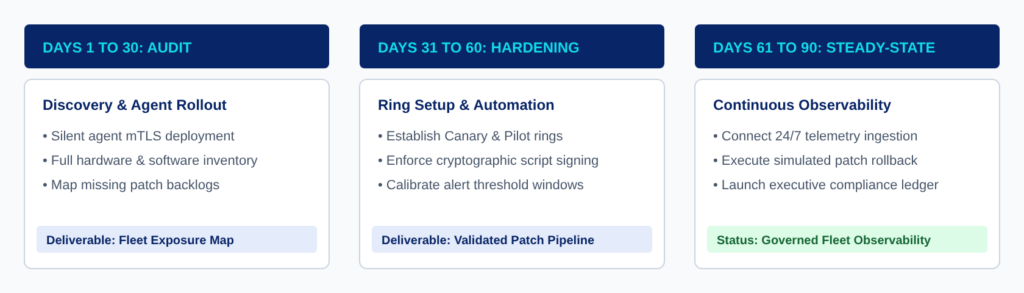
- Days 1 to 30, Discovery and Agent Rollout: Deploy agents silently over mTLS, take a full hardware and software inventory, and map the backlog of missing patches. Deliverable: a fleet exposure map.
- Days 31 to 60, Ring Setup and Automation: Set up the Canary and Pilot rings, enforce cryptographic script signing and calibrate alert threshold windows. Deliverable: a validated patch pipeline.
- Days 61 to 90, Continuous Observability: Connect 24/7 telemetry ingestion, run a simulated patch rollback and launch the compliance reporting ledger. Status: governed fleet observability.
10. Frequently Asked Questions
What is Remote Monitoring and Management (RMM) and how does it work?
RMM is a way of running IT in which a lightweight agent on each endpoint continuously sends system health telemetry and event logs, automates operating system patching and runs maintenance scripts remotely over encrypted mTLS connections, without interrupting the user.
Does an RMM agent slow down employee laptops and workstations?
It should not. Well-built agents run in user space through native operating system APIs, not heavy kernel-mode drivers, and are designed to use a small share of CPU and memory. Ask any vendor for its measured footprint on your standard laptop before you roll it out.
How does RMM software reduce exposure to newly disclosed vulnerabilities?
By shrinking the time between a patch release and a patched fleet. Staged rings take a vendor’s emergency patch through validation cohorts to the full fleet in about four days, against weeks or months for manual cycles. RMM cannot protect against a flaw that has no patch yet, so pair it with EDR and network controls.
Is RMM compatible with the Singapore PDPA and employee privacy?
It can be, with the right scope and notice. Machine health telemetry is routine, but telemetry tied to a named employee is personal data under the PDPA, so you must tell staff what is collected and why, and protect the logs under Section 24. Avoid intrusive tools such as keystroke logging and screen capture.
What is the difference between an RMM tool and a Mobile Device Management (MDM) solution?
MDM handles device configuration, asset tracking and policy enforcement, such as requiring a PIN or wiping a lost phone through cloud APIs. RMM handles low-level operating system observability, command-line automation, granular patch governance and proactive performance fixes.
The Takeaway
The Takeaway: Remote monitoring and management gives you continuous sight of every endpoint, so watch the fleet before an attacker or a bad update does it for you, and treat the RMM tool itself as your most privileged system.
Vinova brings government-grade engineering standards to the endpoint: signed scripts, staged patches and a console hardened as carefully as the machines it manages.
Vinova: Singapore’s mobile and web application development partner since 2010. ISO 27001:2022 and ISO 9001:2015 certified.
300+ in-house engineers across Singapore, Hanoi, Da Nang, and Ho Chi Minh City, including teams who build image-heavy mobile and web applications for enterprise and government clients.
Financial Times Top 500 High-Growth Companies Asia-Pacific 2026. The Straits Times Singapore’s Fastest-Growing Companies 2024, 2025, and 2026.