From automatic screen rotation and mobile gaming to IoT fleet telematics, accelerometers are the sensory nervous system of connected devices. Built into billions of smartphones, wearables and industrial edge gateways, these Micro-Electro-Mechanical Systems (MEMS) measure both the constant pull of gravity and the dynamic forces of movement in real time.
Turning raw vibration into a production-grade mobile feature is harder than it looks. Teams meet high-frequency sensor noise, coordinate drift, battery drain and API differences between platforms. This guide covers the fundamentals of MEMS sensing, compares native and cross-platform paths, gives the algorithms behind common motion features and sets out the enterprise practices that keep motion-aware apps responsive and battery-efficient.
For a CTO, Head of Mobile or product owner, the question is not whether the phone can sense motion. It is whether your app can turn noisy signals into trusted features without draining the battery or exposing personal data.
Table of Contents
1. Understanding the MEMS Accelerometer: Physics and Data Streams
A mobile accelerometer is an electromechanical MEMS sensor that measures acceleration along three Cartesian axes (X, Y and Z). Those forces fall into two categories:
- Static acceleration (gravity): The continuous downward pull of Earth’s gravity (1 g ≈ 9.81 m/s²). Measuring this constant vector tells the device its orientation relative to the ground, which is how screens rotate and inclinometers work.
- Dynamic acceleration: Forces from user movement, device translation, sudden impacts or machine vibration. Software reads the change in these forces over time to detect shakes, steps, swings and free-fall.
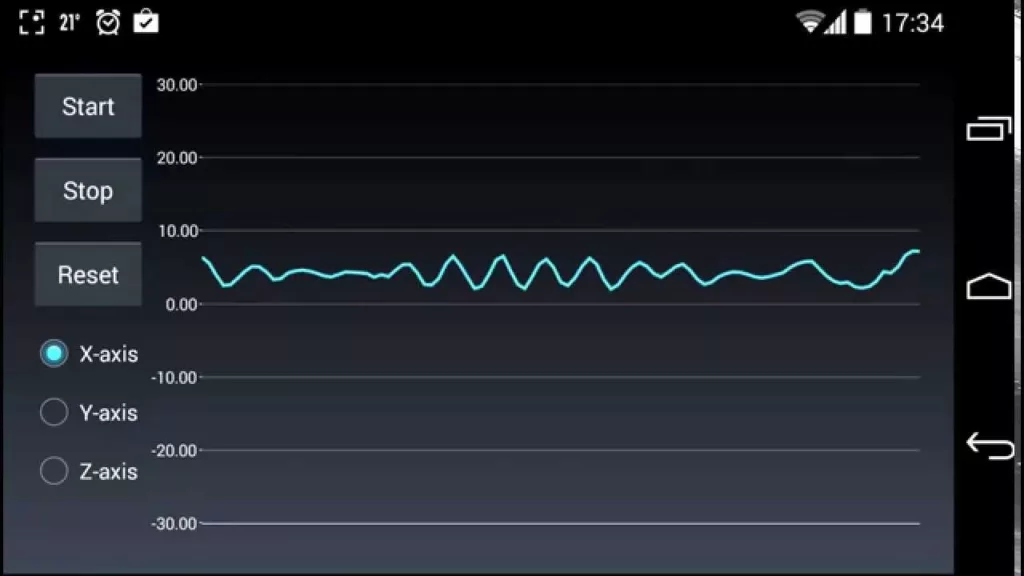
Raw accelerometer data reaches the application layer as a continuous stream with two parts:
- Three-axis vectors (A_x, A_y, A_z): Floating-point values for each axis, in m/s² on Android or in multiples of g on iOS.
- Sensor timestamps (t): Precise timestamps that numerical integration, digital filtering and sensor fusion all depend on.
Platform conventions differ in ways that break cross-platform code, so normalize them early:
Accelerometer Conventions by Platform
| Convention | Android | iOS (Core Motion) |
|---|---|---|
| Units | m/s² | Multiples of g (1.0 is about 9.8 m/s²) |
| Gravity on the Z axis, device flat and face up | About +9.81 | About −1.0 |
| Gravity-free motion | TYPE_LINEAR_ACCELERATION | userAcceleration in CMDeviceMotion |
2. Choosing Your Development Path: Native, Cross-Platform or Web
How you reach the motion hardware depends on your application’s architecture. Before committing code, engineering leads should evaluate the performance tradeoffs between native and hybrid mobile app development against their latency and battery budgets.
Native Mobile Development (Swift and Kotlin)
Native development gives direct, unfiltered access to device sensors and high sampling rates with no framework bridge between your code and the sensor API. That matters for high-fidelity sports tracking and real-time gaming:
- Android (Kotlin): Use SensorManager and SensorEventListener, receiving events in onSensorChanged(). Developers who follow the core principles of Android app development can read Sensor.TYPE_ACCELEROMETER (raw, with gravity) or Sensor.TYPE_LINEAR_ACCELERATION (gravity removed) through the hardware abstraction layer (HAL). On Android 12 and later, sampling above 200 Hz needs the HIGH_SAMPLING_RATE_SENSORS permission.
- iOS (Swift): Use Apple’s Core Motion framework. CMMotionManager delivers CMAccelerometerData by polling or by push updates, and UIResponder handles lightweight shake events. The maximum rate is hardware-dependent and usually at least 100 Hz. Reviewing benchmarks in Swift and React Native for iOS development shows where native Swift threading matters for low-latency sensor handling.
Cross-Platform Frameworks (Flutter and React Native)
Cross-platform frameworks let teams share most application logic across iOS and Android, which lowers total cost of ownership while still supporting standard motion interactions:
- Flutter: Teams using cross-platform development with Flutter typically read sensors through the sensors_plus plugin. Flutter compiles ahead of time to native ARM code and delivers sensor data as Dart streams.
- React Native: Modern React Native mobile app development can use the New Architecture (JSI and TurboModules) or the useAnimatedSensor hook in react-native-reanimated, which drives UI animations on the native UI thread without saturating the JavaScript loop.
Mobile Web APIs (Generic Sensor API)
Browsers expose motion data through the Accelerometer interface (the Generic Sensor API) and the DeviceMotionEvent interface, both over secure contexts (HTTPS). Support differs by browser, and Safari on iOS requires an explicit user permission before it delivers motion events. The web is convenient for zero-install experiences, but background throttling and permission policies limit what motion features can do, so test on your target browsers.
Platform Comparison for Motion Sensing
| Platform | Primary API | Typical rate ceiling | Best use case |
|---|---|---|---|
| Android native | SensorManager, Sensor HAL | 200 Hz by default on Android 12 and later; higher with a permission | High-frequency industrial IoT, robotics, real-time sports telemetry |
| iOS native | CMMotionManager (Core Motion) | Hardware-dependent, usually at least 100 Hz | Augmented reality, native games, continuous health tracking |
| Flutter | sensors_plus | Set by the sampling interval you request, within the OS limits above | Consumer MVPs, interactive dashboards, dynamic UI navigation |
| React Native | useAnimatedSensor (Reanimated) | Configurable interval, within the OS limits above | Interactive commerce feeds, tilt-based UI controls, gesture navigation |
| Web browser | Generic Sensor API, DeviceMotionEvent (HTTPS) | Browser-defined and often throttled | Interactive marketing pages, lightweight web minigames |
These are typical ceilings, not guarantees. Confirm the achieved sampling rate on the devices you ship to.
3. Initial Data Processing: Isolating Gravity and Reducing Noise
Raw accelerometer data is not ready for production use. Sensor hardware is subject to thermal drift and high-frequency noise, and the gravity vector is always present. Isolating useful motion takes filtering:

- Low-pass filter (LPF): Keeps the slowly changing gravity component and removes sudden, high-frequency movement. The gravity vector it produces is what you use to calculate steady tilt.
Gravity_t = α × Gravity_(t−1) + (1 − α) × Raw_t
- High-pass filter (HPF): Isolates user movement by subtracting the low-pass gravity baseline from the raw signal.
LinearAcceleration_t = Raw_t − Gravity_t
- Sensor fusion and dead reckoning: Combining the accelerometer with gyroscope and magnetometer data reduces orientation drift and heading ambiguity. Integrating raw acceleration twice to estimate position drifts within seconds, so navigation features rely on fused sensors and step-and-heading models. When developing location and GPS applications, this keeps navigation continuous indoors or in tunnels when satellite signals drop.
- Stream visualization: For testing, streaming real-time charts in mobile apps with Firebase lets QA engineers inspect the signal and tune filter thresholds live.
4. Practical Motion Algorithms: Four Production Use Cases
Four foundational motion algorithms appear across commercial mobile apps. Treat every threshold below as a starting point to calibrate on real devices and real users.
4.1 Shake Detection
Used for “shake to undo”, feedback logging or shuffling playlists. Instead of tracking position, the algorithm watches for rapid changes in acceleration across all three axes:
- Calculation: Sum the differences between consecutive samples:
ΔForce = |A_x,t − A_x,t−1| + |A_y,t − A_y,t−1| + |A_z,t − A_z,t−1|
- Debouncing and refractory window: When ΔForce passes a calibrated threshold, register a shake. Enforce a cooldown, for example 500 ms, so one physical shake does not trigger several events.
4.2 Inclinometer and Tilt Sensing (Spirit Level)
Used in virtual spirit levels, camera leveling aids and tilt-to-steer controls. After low-pass filtering, the gravity vector gives the device’s pitch and roll:
- Pitch (rotation around the X axis):
Pitch = atan2(A_y, √(A_x² + A_z²)) × (180 ÷ π)
- Roll (rotation around the Y axis):
Roll = atan2(−A_x, A_z) × (180 ÷ π)
Sign conventions depend on the platform and on how you define the axes, so check them against the table in Section 1 and verify on a physical device.
4.3 Free-Fall and Fall Detection
Free-fall detection is used for hard drive head parking, safety wearables and the architecture of enterprise health and wellness apps for remote monitoring of older adults. In free-fall the device accelerates with gravity, so the sensor readings on all three axes collapse toward zero:
- Threshold check: Calculate the total acceleration magnitude:
|A| = √(A_x² + A_y² + A_z²)
- Validation window: If |A| drops below a low threshold (for example 0.3 g, about 2.9 m/s²) and stays there for a continuous 20 to 30 ms, register a free-fall event. Wearable fall detection usually adds an impact spike and a period of inactivity to cut false alarms.
4.4 Step Counting (Peak Detection With Band-Pass Filtering)
In digital healthcare mobile applications, battery efficiency and step accuracy both matter. Production apps should use the platform’s hardware step counters, such as Android’s Sensor.TYPE_STEP_COUNTER or Core Motion’s CMPedometer. Custom detection works on the vertical acceleration wave:
- Band-pass filtering: Keep the frequencies of human walking. Walking cadence is typically around 1.5 to 2.5 steps per second and running is faster, so set the pass band for the activities you support.
- Dynamic peak thresholding: Count a step only when a local peak exceeds a moving threshold and passes a debouncing gate, for example ignoring intervals shorter than 200 ms.

5. Enterprise Best Practices: Battery Budgets and Privacy Safeguards
Deploying motion algorithms at scale takes operational discipline to prevent battery drain and privacy failures across the end-to-end mobile app development process.
5.1 Eliminate Main-Thread Polling and Use Hardware Batching
Polling high-frequency sensors on the main UI thread causes frequent CPU wake-ups and thermal throttling. Enterprise apps use hardware FIFO sensor batching, such as the maximum report latency option in Android’s sensor registration. The sensor hub buffers readings in hardware and delivers them in groups, so the CPU wakes less often. The saving depends on the device and on hardware FIFO support, so measure it on your target hardware.
5.2 Lifecycle-Aware Sensor Teardown
One of the most common defects in mobile development is failing to unregister sensor listeners when an app pauses or moves to the background. Unless the app is deliberately built as a foreground service, such as GPS fitness tracking, stop listeners cleanly in onPause() on Android or viewDidDisappear() on iOS.
5.3 Regulatory Privacy and Sensor Fingerprinting
Motion data can reveal more than it seems, from activity and location inferences to gait patterns, and research has shown that sensor imperfections can be used to fingerprint a device. When motion data can be linked to an identifiable person it is personal data, so Singapore’s Personal Data Protection Act (PDPA) applies. That includes the security duty in Section 24, plus the consent and notification obligations. An enterprise mobile app security and privacy checklist helps you cover these systematically.
- Declare clear usage justifications where the platform asks for them, such as NSMotionUsageDescription on iOS for Core Motion activity data and the ACTIVITY_RECOGNITION permission on Android for step and activity sensors.
- Process on the device where you can, for example with TensorFlow Lite, so raw accelerometer data does not leave the device unencrypted, and keep only the features you need.
Architectural Perspective: In our work on real-time mobile tracking and industrial telemetry, we often see teams hand-build pedometers and orientation filters from raw streams on the CPU. Platform architects have spent years tuning sensor hubs and motion coprocessors. Where you can, build on the platform’s fused outputs, such as Sensor.TYPE_LINEAR_ACCELERATION on Android or CMDeviceMotion on iOS. You typically gain accuracy, avoid manual drift handling and use less battery. Measure the difference on your own devices.
How Vinova Delivers Motion-Aware and Sensor-Driven Mobile Apps
Apps that work directly with hardware sensors need more than standard front-end skills. Vinova’s delivery framework helps organizations prototype, test and scale sensor-driven products with clear scope, cost and governance, and government-grade rigor.
Vinova Engagement Models for Sensor-Driven Mobile Apps
| Engagement model | Best for | What you get |
|---|---|---|
| Turnkey MVP acceleration | Startups and product teams validating motion-based features, health-tracking logic or gesture interaction | End-to-end delivery from PRD and FRD scoping and signal-processing architecture to App Store and Google Play release, typically in 6 to 10 weeks depending on scope |
| Dedicated agile engineering pods | Enterprise teams scaling complex IoT, logistics or digital health apps | Cross-functional squads of senior mobile architects, backend microservice engineers and QA specialists, working in two-week sprints and tracked against DORA delivery metrics |
| Hybrid delivery | Programs that need senior oversight and cost balance | Project direction, compliance reviews (PDPA) and on-site architecture led by our Singapore team, with engineering delivered from our Vietnam delivery centers for a lower total cost of ownership than an all-Singapore team |
| Enterprise SLA and staged transition | Products moving into live operation | A formal four-stage service transition and SLA-backed maintenance covering OS updates, hardware and API deprecations, and continuous battery and performance tuning |
Vinova, a Singaporean Government-Grade Technology Partner, Made Accessible, has delivered more than 300 projects across custom software, mobile, data, AI and cybersecurity over 16 years. Vinova’s approach is built around accountability:
- Fiduciary Governance & Regulatory Alignment: Delivery operations certified under ISO 27001:2022 (Information Security) and ISO 9001:2015 (Quality Management) and GovTech Category 1B approved, with apps designed to align with the PDPA and sector regulator expectations.
- Singapore Corporate Governance: Master Services Agreements governed under Singapore law with SIAC arbitration, so IP ownership and accountability are defined before the first commit.
- Mobile Engineering Practice: Native and cross-platform apps, sensor and motion processing, on-device privacy design and platform-level battery optimization, built around the practices in this guide.
- Engineering Depth: 300+ in-house engineers across Singapore and Vietnam delivery hubs in Ho Chi Minh City, Da Nang, and Hanoi, with 8% to 12% annual voluntary attrition, so the people who build your app are still there to run it.
Build High-Performance Mobile Applications with Vinova
Motion sensing unlocks dynamic, intuitive and context-aware mobile experiences. Getting it right means balancing mathematical precision against real hardware limits, and that takes architects who understand hardware abstraction, thread synchronization and power management. Filter early, use platform sensors where they exist, calibrate every threshold on real devices and design the privacy model before you collect a single sample.
Ready to engineer a motion-aware mobile application? Contact Vinova’s Singapore mobile engineering team for an architectural consultation.
Vinova: a Singaporean Government-Grade Digital Transformation Partner, Made Accessible. For 16 years, we have designed digital systems for 300+ companies and government agencies worldwide, backed by ISO 27001:2022 and ISO 9001:2015 certification and Singapore GovTech Category 1B approval.
300+ employees across offices in Singapore, Vietnam (Hanoi, Da Nang, Ho Chi Minh City), Norway (Oslo), and Thailand (Bangkok), scaling platforms and engineering capacity to serve clients across the globe.
Financial Times Top 500 High-Growth Companies Asia-Pacific 2026. Recognized among Singapore’s Top 100 Fastest-Growing Companies in 2024, 2025, and 2026.