Is your web platform still just a digital brochure, or has it become the thing your business actually runs on? That’s the real question behind web app development in 2026. The line between “website” and “software” has basically disappeared. What used to be a marketing page is now expected to run workflows, talk to your backend systems in real time, and hold up under the kind of security scrutiny that used to be reserved for desktop software.
We’re not going to tell you to chase every trend on this list. At Vinova, we’ve built enough of these platforms, 300+ delivered, 16+ years, ISO 9001 and ISO 27001 certified, to know that the trends worth adopting are the ones that move a real business metric: faster load times, fewer support tickets, one less legacy system you have to babysit. Here are the 12 web app development trends we think are actually worth your attention this year, and where we’ve already put them to work.
Table of Contents
Kay takeaways:
- AI-Accelerated Development: Modern frameworks handle the heavy lifting out of the box, and using AI natively in development workflows can accelerate delivery cycles by up to 40%.
- AI Must Be Foundational: Move beyond basic, bolted-on chatbots; true business value comes from embedding AI directly into applications to predict user needs and automate workflows.
- Seamless Legacy Integration: Modern web apps must securely connect with existing enterprise backends (like SAP) to eliminate manual entry—a strategy that has accelerated development speed by up to 60% for enterprise clients.
- Enterprise Quality at a Lower Cost: Utilizing a hybrid delivery model (local Singaporean oversight paired with offshore engineering) ensures government-grade security and compliance at 55–65% below the cost of local hiring.
What Counts as a “Web Application” in 2026?
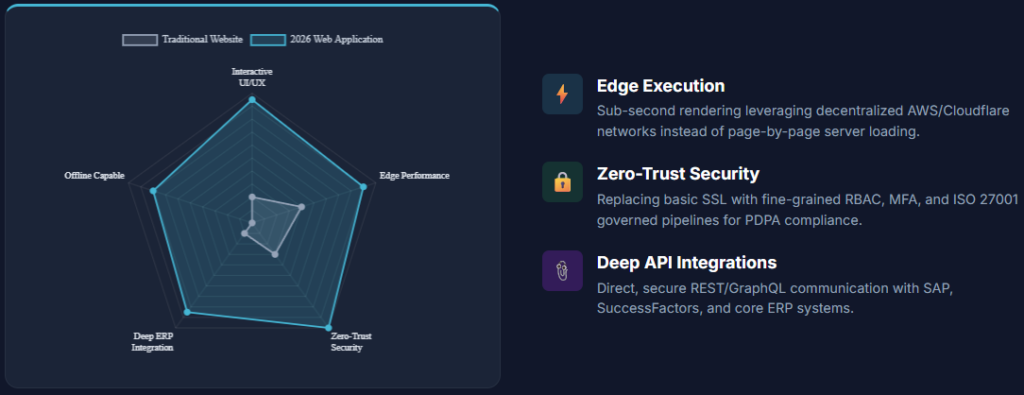
Short answer: if it processes data, talks to a backend, and does real work for the user beyond displaying a page, it’s a web app, not a website. A web application runs dynamic logic in the browser: multi-step workflows, live data connections, client-side processing. A traditional website mostly just shows you something. Here’s the practical difference:
| Feature | Traditional Website | 2026 Web Application | Vinova Enterprise Approach |
| Primary purpose | Informational brochureware, corporate marketing | Operational nerve centre, transactional portals, SaaS platforms | Business process automation and multi-role workflows |
| User experience | Page-by-page loading, fixed layouts | Sub-second edge execution, instant UI updates, offline capability | Design Thinking coupled with component-driven UI libraries |
| Integrations | Basic forms, embedded maps, isolated analytics | Deep back-office pipelines (SAP, SuccessFactors, Salesforce, REST/GraphQL) | API-first microservices architecture and secure middleware |
| Security standard | Standard HTTPS SSL certificates | Zero-Trust architecture, fine-grained RBAC, PDPA compliance | ISO 27001 certified governance, audit logs, penetration testing |
Three flavours you’ll actually be choosing between
- Single-Page Applications (SPAs): the page never fully reloads, everything updates in place. Good fit for dashboards, internal tools, and anything users spend hours inside
- Progressive Web Applications (PWAs): a web app that behaves like a native app, offline support, push notifications, home-screen install, without the App Store approval process
- Desktop-class web apps: heavy-duty browser tools (document editors, CAD viewers, analytics dashboards) running on WebAssembly, doing work that used to require installed software
The 12 Web App Development Trends Worth Your Attention
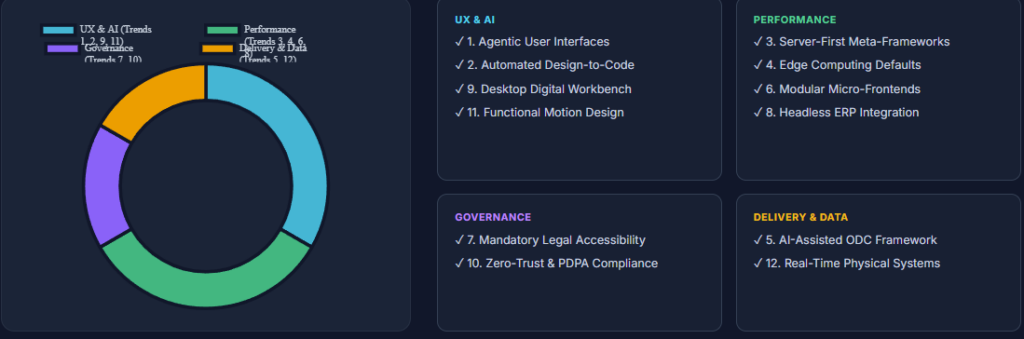
| User Experience and AI | Performance and Architecture | Governance |
| 1. Agentic User Interfaces 2. Automated Design-to-Code 9. Desktop Digital Workbench 11. Functional Motion and UI | 3. Server-First Meta-Frameworks 4. Edge Computing Defaults 6. Modular Component Layouts 8. Headless ERP Integration | 7. WCAG and Legal Accessibility 10. Zero-Trust and PDPA |
1. Agentic User Interfaces
Your users are tired of chatbots bolted onto the corner of the screen that don’t actually do anything. The shift in 2026 is toward interfaces that expect AI to be part of the workflow, not a sidebar feature: the app anticipates what a user needs next, fills in the tedious parts, and only asks for input when it genuinely can’t guess. Less clicking, fewer forms, fewer support calls.
We built this for Singapore Institute of Technology, working alongside AWS, Est-Rouge, and Avaiga: prediction engines that flag which students need help, course recommendations, and campus resource planning, all surfaced to the right person automatically instead of buried in a report nobody reads.
2. Design-to-Code, Without the Handoff Delay
Every team has lived through this: the designer finishes a beautiful Figma file, and then it takes engineering three weeks to get the spacing right. That gap is mostly gone now. Design tokens translate directly into production code, so your design system and your codebase stay in sync automatically instead of drifting apart every sprint.
Our Sprint 0 workshops build a single Figma Design System per client, then map it straight into React and Angular components. The result: enterprise portals that look consistent across every screen, without a designer manually checking each one.
3. Meta-Frameworks Are Just the Default Now
Nobody should be hand-configuring a bundler in 2026. Next.js and Nuxt handle server-side rendering, static generation, and caching out of the box, which means your pages load fast without your team reinventing infrastructure that’s already been solved. Fast load times aren’t a nice-to-have here; they’re directly tied to conversion and search ranking.
For the Porsche Experience Centre (PEC+) Singapore booking system, this is exactly what let us hit a luxury-brand-level load speed on a modern meta-framework, on both mobile and desktop, without the site feeling like a compromise.
4. Edge Computing, Because Nobody Waits for a Round Trip to a Server Anymore
If your app’s logic lives in one data centre and your customer is on the other side of the world, they feel every millisecond of that trip. Edge computing pushes logic out to servers physically close to the user, so pages render fast no matter where someone is logging in from, and a traffic spike in one region doesn’t take down your core backend.
We run this on AWS and multi-cloud serverless setups for clients operating across Singapore, ASEAN, and further afield, so regional platforms stay fast and resilient without a single point of failure.
5. AI Doesn’t Replace Your Engineers, It Removes the Boring Parts
Boilerplate code, repetitive test scripts, first-pass code review, that’s what AI tools are actually good at right now. Copilot, Cursor, and Claude Code handle the repetitive 80% so your senior engineers spend their time on the 20% that actually requires judgment: architecture decisions, edge cases, the stuff a model can’t reason through on its own.
For SP Group (SP Digital), we ran this through our AI-Assisted Offshore Development Centre framework: Copilot, Cursor, and automated Playwright QA pipelines built into the squad’s daily workflow, not bolted on as an afterthought. Delivery got faster without quality slipping.
6. Break the Monolith Before It Breaks You
A single, tangled codebase means every change is a gamble, touch one thing, break three others you didn’t expect. Modular components and micro-frontends let teams ship a piece of functionality without risking the whole platform, and let you bolt a new feature onto an old system without a full rebuild.
We built exactly this for the JP VAL module: a standalone Angular application that slots into a client’s existing corporate portal inside the Jurong Port environment. No rip-and-replace of the legacy system underneath, just a clean piece that fits in.
7. Accessibility Isn’t Optional Anymore, It’s a Procurement Requirement
If you’re bidding for public sector work, or frankly just trying to avoid a legal headache, WCAG 2.1/2.2 AA compliance isn’t a nice-to-have. Keyboard navigation, screen reader support, adaptive display settings, these need to work, not just technically exist.
Vinova builds government-grade portals to GovTech Singapore’s ICT standards as a baseline, with automated and manual screen-reader testing on every single release, not a one-time audit before launch.
8. Your Legacy ERP Doesn’t Have to Hold Your UI Hostage
Ripping out SAP or Salesforce because the front end looks dated is expensive and usually unnecessary. Headless, API-first architecture lets you build a modern interface on top of the backend you already have, connecting through REST or GraphQL instead of forcing a platform migration nobody budgeted for.
This is exactly what we did for EM Services’ Gofix FM platform and for Navig8: modern, mobile-friendly frontends talking to existing SAP and SuccessFactors systems underneath, automating facilities management and workforce scheduling without touching the core databases.
9. Some Software Doesn’t Need to Leave the Browser Anymore
Document management, CAD viewing, heavy data analytics, tasks that used to require an installed desktop app can now run inside a browser tab using WebAssembly. That means no installation, no per-device licensing headache, and your team can work securely from any machine.
The Digital Workbench we built for IPOS International (the Intellectual Property Office of Singapore) replaced a chunk of desktop software entirely: document management, Office 365 integration, multi-stage approvals, and role-based security, all in one browser-based workspace.
10. Zero-Trust Security Is the Baseline, Not the Upgrade
“We’ll add security later” isn’t a plan enterprise clients accept anymore. Continuous identity verification, strict multi-factor authentication, and role-based access control need to be there from day one, along with real compliance with PDPA and equivalent data protection laws, not a checkbox exercise before a client audit.
We’ve built this for the Monetary Authority of Singapore and GovTech Singapore, two of the most demanding compliance environments you can build for, to ISO 27001 and government security standards throughout.
11. Motion That Actually Tells the User Something
Animation for its own sake is just noise. The motion design that matters in 2026 confirms an action succeeded, guides someone through a multi-step form, or signals that something is happening in the background so users don’t hit submit five times in confusion. Done right, it cuts support tickets from people unsure whether their action actually worked.
Our UX teams map these micro-interactions directly into user journeys, on booking engines, financial dashboards, enterprise portals, as part of the same Design Thinking process, not a polish pass at the end.
12. Your Web App Can Now Talk Directly to the Physical World
Sensors, port infrastructure, fleet tracking, real-time WebSockets and streaming APIs mean your operations team can watch what’s actually happening right now, not what a batch report told them happened yesterday.
We’ve built this for PSA Singapore and Jurong Port: high-availability systems handling live, mission-critical data streams in some of the most demanding port environments anywhere.
How We Actually Build These: The 6-Phase Process
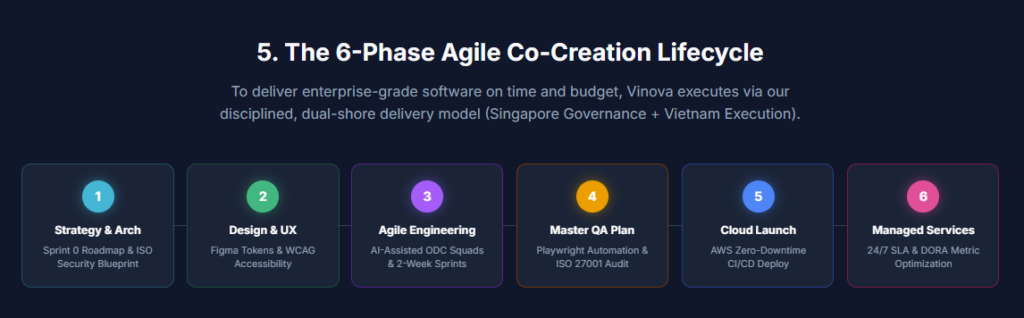
None of the above matters if delivery falls apart. Here’s the process we run every project through:
| Phase | Key Activities |
| 1. Strategy, Architecture and Sprint 0 | Stakeholder alignment and business objective mapping; tech stack selection; security blueprinting aligned to ISO 27001 and PDPA |
| 2. Design Thinking (UI/UX) and Prototyping | Human-centred user journey mapping and wireframing; interactive Figma prototypes and design token systems; WCAG 2.1/2.2 accessibility audits |
| 3. Agile Engineering and Hybrid Squad Execution | Iterative 2-week sprints under Singapore governance; scalable execution from Vinova’s Vietnam ODC; AI-accelerated coding via Copilot and Cursor |
| 4. Master Test Plan and Shift-Left QA | Automated Playwright test stories built into CI/CD; performance and load testing under simulated enterprise traffic; penetration and vulnerability audits |
| 5. Cloud Deployment and Release Management | Automated zero-downtime deployment on AWS or Azure; backup, disaster recovery, and high-availability configuration; production readiness review |
| 6. Post-Launch DevOps and SLA Support | 24/7 uptime monitoring, error logging, and performance monitoring; continuous enhancement governed by DORA quality metrics |
Where These Trends Show Up, By Industry
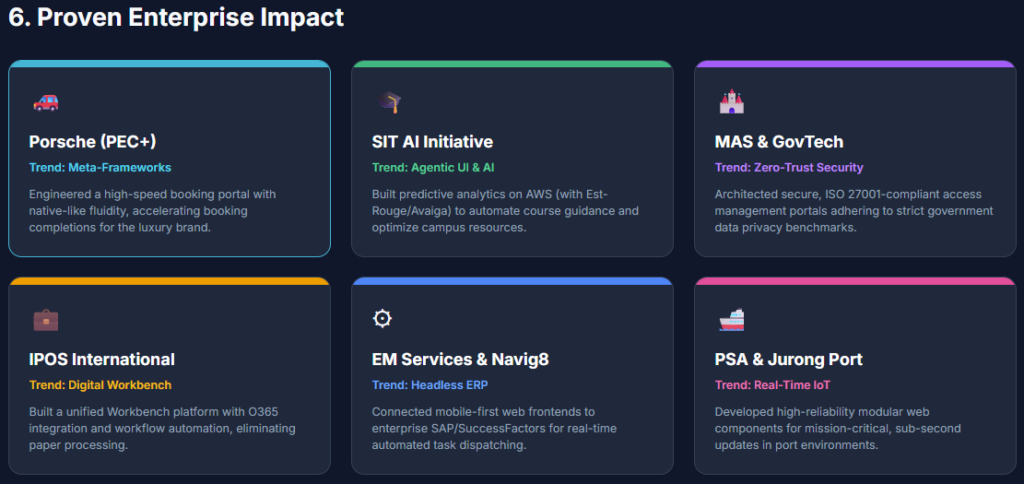
| Industry | Enterprise Challenge | Applied 2026 Trend | Vinova Solution | Business Outcome |
| Luxury and E-Commerce | High bounce rates on complex booking systems | Meta-frameworks and server-first UX | Porsche Experience Centre (PEC+) Singapore booking portal | Accelerated booking completions and premium customer engagement |
| Higher Education | Manual student advisory and resource bottlenecks | Agentic UI and cloud AI/ML | SIT AI Initiative: predictive analytics platform | Automated course guidance and optimised resource allocation |
| Public Sector and Finance | Strict regulatory mandates and high access control | Zero-Trust security and accessibility | GovTech and MAS: secure access management portals | Sustained compliance with government security and data privacy benchmarks |
| Enterprise Operations | Legacy document silos and fragmented approvals | Desktop digital workbench | IPOS International: unified Workbench with O365 integration | Eliminated paper processing, streamlined IP management |
| Facilities and Logistics | Siloed field data and disconnected ERP backends | Headless SAP integration and mobile web | EM Services (Gofix FM) and Navig8: SAP-connected mobile frontends | Real-time automated task dispatching and job tracking |
| Maritime and Ports | High-security, high-availability operational tracking | Real-time IoT and modular components | PSA Singapore and Jurong Port: modular web components | Sub-second operational updates in complex port environments |
Why Work With Vinova on Web App Development Trends
- 16+ years in the field: 300+ applications delivered for 250+ clients globally, not a team learning on your project
- ISO 9001 and ISO 27001 certified: quality and security aren’t a slide in the pitch deck, they govern how every project actually runs
- The Hybrid Delivery Model: Singapore-based leadership for accountability and communication, backed by our Vietnam engineering centre for scale, without the cost of an entirely onshore team
- AI-assisted quality engineering: Shift-Left automated testing, continuous integration, and DORA benchmarking, so stability isn’t something you find out about after launch
| Ready to Accelerate Your Digital Product Strategy? Book a free 2-hour Digital Readiness Audit with Vinova’s technical architects. We’ll look at your current stack, flag what’s slowing you down, and map out a plan for 2026. No commitment required. Book Your Free Technical Audit with Vinova |
Web App Development Trends FAQ
How long does it actually take to build an enterprise web application?
Usually 12 to 24 weeks, depending on how complex your integrations are and what security clearance the project needs. Using pre-built component libraries and our AI-accelerated delivery framework can cut that by up to 30%, but be wary of anyone promising a fraction of that timeline for genuinely complex enterprise scope.
How do you actually handle PDPA and data security, not just claim to?
We’re ISO 27001 certified, which means Zero-Trust access control, end-to-end encryption, role-based permissions, and Singapore-region cloud deployment as standard, not add-ons. For MAS or government-adjacent work specifically, that extends to continuous audits on every release, not a one-time certificate we point to.
Can you modernise our front end without touching our existing database?
Yes, and this is one of the most common requests we get. Headless, API-first architecture lets us build a modern interface on top of SAP, Oracle, or whatever custom backend you’re already running, so you get the new experience without a risky database migration. It’s exactly what we did for EM Services and Navig8.
What’s the actual difference between a web app and a PWA?
Every PWA is a web app, but not every web app is a PWA. A regular web app can be fully interactive without working offline. A PWA specifically adds offline support, push notifications, and home-screen installation on top, using service workers to cache data. Whether you need that depends on whether your users are genuinely working with unreliable connectivity, field teams, remote sites, not just whether it sounds impressive.
Do these trends matter if we’re not a huge enterprise?
Most of them, yes, just in a different order. You probably don’t need real-time IoT integration on day one. But fast-loading meta-frameworks, API-first architecture that won’t box you in later, and accessibility compliance are worth building on from the start, because retrofitting them after launch costs more than building them in from day one. We map out what actually matters for your size and budget before recommending anything.
| Vinova: Singapore’s web app development partner tracking the trends that matter, since 2010. ISO 27001:2022 and ISO 9001:2015 certified. PDPA and GovTech IM8 aligned. 300+ in-house engineers across Singapore, Hanoi, Da Nang, and Ho Chi Minh City. Clients include Porsche Experience Centre Singapore, SIT, SP Group, GovTech Singapore, MAS, IPOS International, EM Services, Navig8, PSA Singapore, and Jurong Port. Financial Times Top 500 High-Growth Companies Asia-Pacific 2026. The Straits Times Singapore’s Fastest-Growing Companies 2024, 2025, and 2026. Explore Vinova’s web application development services: |