The mobile app market is booming, and in 2026, incorporating AI is no longer a novel experiment. It’s the baseline expectation. But building a successful AI-powered mobile app is fraught with technical and strategic traps. Most mobile AI initiatives stall or fail because teams repeat the same AI app mobile common mistakes in architecture, mobile performance, security, and user experience.
If you’re planning to build or scale an AI application, avoiding these missteps is essential to securing funding, retaining users, and keeping operating costs under control.
At Vinova, we’ve spent 16+ years delivering 300+ enterprise and mobile solutions for 250+ clients globally. We’ve seen firsthand where teams stumble, and how to steer clear of costly mistakes. Here’s our guide to the 10 AI app mobile common mistakes and how to avoid them in 2026.
Table of Contents
Quick Reference: AI App Mobile Common Mistakes at a Glance
| # | Mistake | What It Actually Looks Like |
| 1 | Building a thin wrapper | No proprietary data or logic underneath |
| 2 | Treating privacy as an afterthought | Retrofitting compliance after launch, not before |
| 3 | Skipping Zero-Trust security | Hardcoded API keys and weak session verification |
| 4 | Launching unaligned models | No human-in-the-loop review before output reaches users |
| 5 | Shipping unoptimised AI code | Heavy client-side packages, laggy UI, battery drain |
| 6 | Clunky onboarding | Burning CAC on drop-off before users see any value |
| 7 | Skipping bias audits | Deploying models without fairness testing across user groups |
| 8 | Treating launch as “done” | No plan for model drift or ongoing MLOps |
| 9 | Ignoring cloud cost architecture | Every tap hitting an expensive foundation model |
| 10 | Defaulting to a chatbot window | Forcing users to type instead of building agentic UI |
Mistake 1: Building a “Thin Wrapper” Instead of a Defensible Product
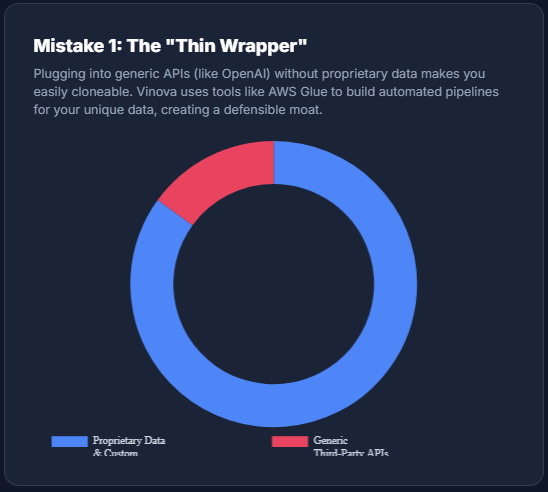
Many startups launch mobile AI apps that simply plug into generic third-party APIs (like OpenAI) without adding proprietary value or business logic.
Why it’s a mistake: thin wrappers are easy to replicate, offer zero defensibility against competitors, and rarely attract venture capital or long-term user loyalty.
How to avoid it: build your mobile AI application around proprietary data and specialised workflows. When we architect platforms for institutions like the Singapore Institute of Technology (SIT), we focus on building automated data pipelines (using cloud tools like AWS Glue) to structure organisation-specific data. An app that leverages your unique business data to automate complex tasks creates a defensible moat competitors can’t easily clone.
Mistake 2: Treating Data Privacy and AI Regulation as an Afterthought
In 2026, regulatory enforcement around artificial intelligence is active and stringent, including the EU AI Act, Apple’s App Tracking Transparency (ATT), CCPA, and regional financial privacy frameworks.
Why it’s a mistake: postponing compliance until after launch can lead to App Store rejections, severe regulatory fines, or your app being forced offline overnight.
How to avoid it: adopt a compliance-by-design engineering process from day one. Ensure user data consent is explicitly gathered in mobile onboarding and that AI models handling sensitive user data remain transparent and explainable. Building auditable, privacy-compliant data flows into your app’s core architecture protects your business from legal exposure.
Mistake 3: Neglecting Mobile Security and Zero-Trust Protection
As mobile apps become smarter, cyberattacks become more sophisticated. Hackers frequently target mobile API endpoints, local device storage, and automated authentication flows.
Why it’s a mistake: traditional authentication and perimeter security can’t stop AI-driven phishing, synthetic identity fraud, or reverse-engineered API keys stored inside mobile binaries.
How to avoid it: implement a strict Zero-Trust architecture, verifying every user session, API call, and network payload continuously. Protect mobile API keys by keeping heavy logic on secure backend servers rather than hardcoding credentials on the device. We also run an AI-Driven QA Framework (leveraging automated testing tools like Playwright) to actively probe codebases for vulnerabilities before production releases.
For more on cybersecurity on your mobile app, read our guide here.
Mistake 4: Launching Unaligned AI Models Without Human Oversight
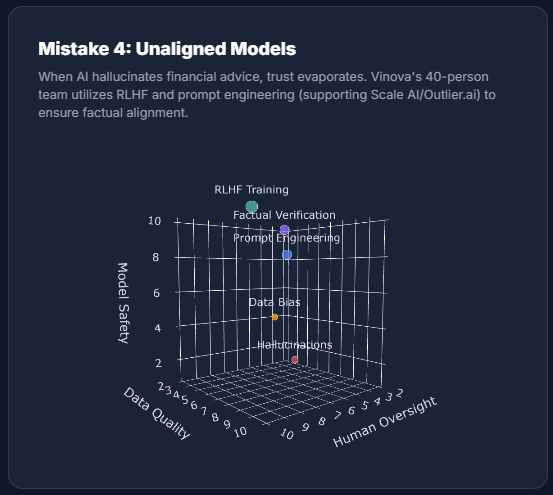
When AI features hallucinate, give incorrect financial or medical advice, or output unvetted information directly to a mobile user’s screen, the damage is immediate.
Why it’s a mistake: a single viral hallucination or severe error can permanently destroy user trust and generate devastating public relations fallout.
How to avoid it: keep humans in the loop to evaluate and align model outputs continuously. We don’t just consume AI models; we actively refine them. Vinova maintains a dedicated team of 40 experts supporting major AI platforms (such as Outlier.ai by Scale AI) focused on prompt engineering, factual verification, and Reinforcement Learning from Human Feedback (RLHF). Bringing this level of evaluation to your mobile app prevents dangerous hallucinations.
Mistake 5: Overloading the Mobile App with Heavy, Unoptimised AI Code
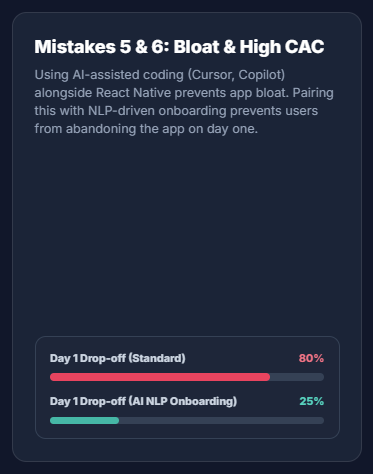
Rushing features to market often leads to unoptimised model queries, bulky client-side packages, and excessive network polling on mobile devices.
Why it’s a mistake: mobile users are unforgiving. Apps that suffer from high latency, laggy UI rendering, or rapid battery drain lead directly to negative App Store reviews and uninstalls.
How to avoid it: prioritise mobile performance optimisation from week one. Use cross-platform frameworks like React Native or Flutter paired with performant backend systems (like Python or Node.js). Vinova’s development teams use AI-assisted tools (GitHub Copilot and Cursor) to write, audit, and optimise code quickly, keeping client binaries lightweight, the same approach behind our enterprise systems for SP Group and Gofix FM.
Mistake 6: Burning Acquisition Budget on a Clunky Onboarding Flow
Acquiring a new mobile app user in competitive niches like fintech or healthtech is increasingly expensive. Yet many teams force users through long, confusing activation steps before delivering any value.
Why it’s a mistake: high user acquisition cost (CAC) is wasted if a large share of new installs drop off during the first 24 hours because of poor UX or confusing UI.
How to avoid it: streamline registration and use AI to personalise initial interactions immediately. For a recent engagement with PEC+ Singapore, we designed intelligent NLP conversational interfaces to deliver instant, personalised visitor support. When an app anticipates user intent in the first minute, onboarding drop-off decreases and retention rises.
Mistake 7: Deploying Biased AI Models Without Fairness Audits
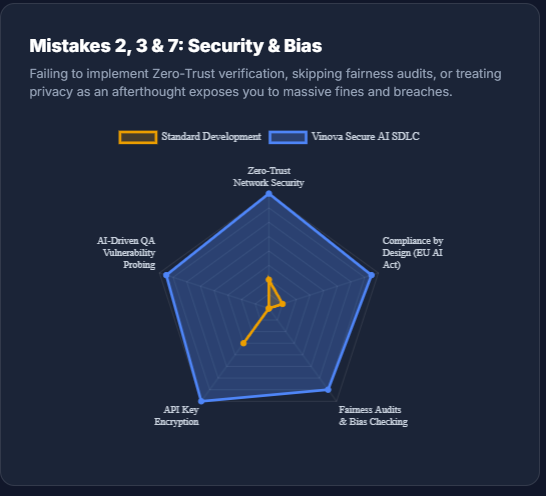
Machine learning models learn patterns from historical datasets. If that data contains systemic biases or demographic gaps, the AI will replicate those disparities in production.
Why it’s a mistake: an AI model that unfairly rejects user applications or provides discriminatory service recommendations creates major ethical breaches and legal liability.
How to avoid it: conduct rigorous, multi-demographic data validation and continuous fairness audits. Test model outputs across diverse user scenarios to keep outcomes equitable and unbiased before releasing automated decision-making features into your live mobile app.
Mistake 8: Treating AI Development as a “One-and-Done” Project
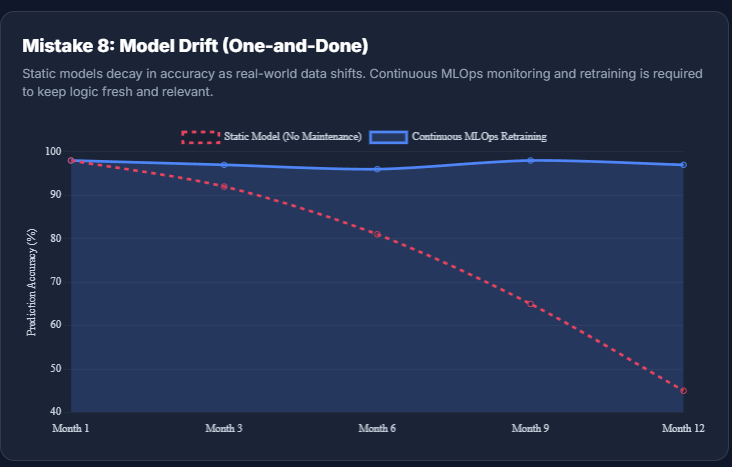
A common misconception among non-technical founders is that once a mobile AI app is launched, the engineering effort is complete.
Why it’s a mistake: real-world data constantly shifts. Over time, static AI models suffer from model drift, resulting in decaying accuracy, irrelevant recommendations, and broken feature logic.
How to avoid it: plan for continuous MLOps and post-launch maintenance. Establish automated monitoring pipelines to track live model metrics. When drift is detected, your engineering partner should retrain and redeploy updated models seamlessly, keeping your mobile app accurate and reliable year after year.
Mistake 9: Failing to Optimise Cloud Architecture (Facing “Bill Shock”)
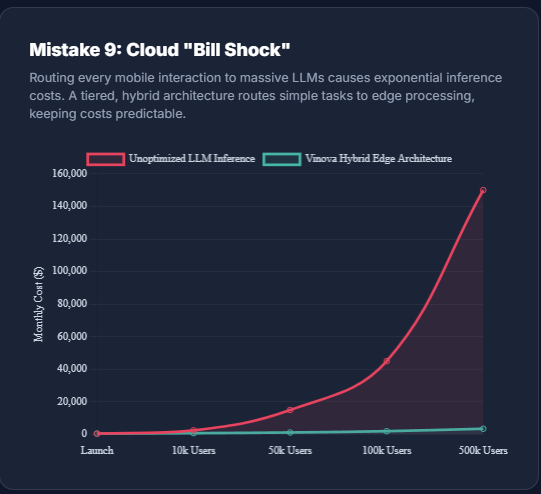
Running foundation models and large language models (LLMs) requires substantial cloud computing power. Every time a mobile app user triggers an AI action, it incurs inference costs.
Why it’s a mistake: if your mobile app scales rapidly, sending every basic tap or query to high-parameter cloud models can generate overwhelming server bills that erode your profit margins.
How to avoid it: design a tiered, cost-effective hybrid architecture. Route simple everyday interactions to smaller, hyper-efficient models, or handle them locally on-device with edge processing, reserving resource-intensive foundation models strictly for complex tasks. This keeps response times fast while keeping cloud infrastructure costs predictable.
Mistake 10: Forcing Mobile Users Into Clunky Chatbot Windows
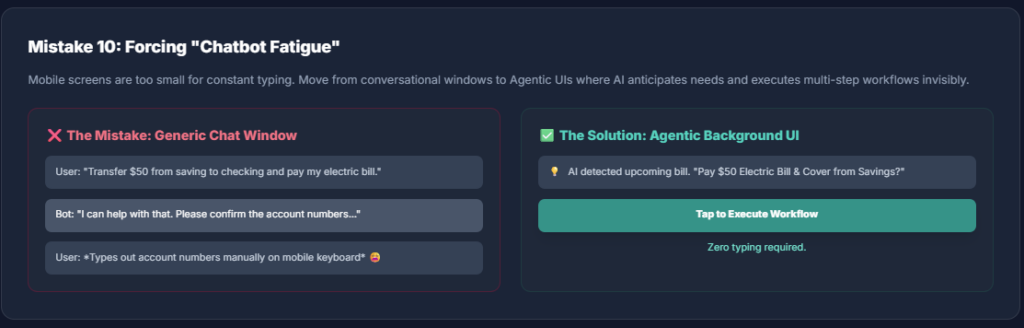
Many mobile developers default to placing a generic chat window inside their app as the primary way to interact with AI features.
Why it’s a mistake: users on 6-inch touchscreens are experiencing widespread “chatbot fatigue.” Forcing them to type out long text prompts to accomplish basic tasks creates friction and feels outdated.
How to avoid it: design Agentic UIs where AI operates seamlessly behind native mobile interface components: buttons, contextual menus, automated background triggers. The app should predict what the user wants and perform multi-step actions automatically, creating a fast, intuitive experience.
How Vinova Remedies These AI Mobile App Mistakes
Building an AI-powered mobile app requires more than plugging in API endpoints; it demands deep engineering rigour, robust compliance, and continuous monitoring. With over 16 years of enterprise solution delivery, 300+ in-house engineers, and ISO 27001:2022 and ISO 9001:2015 certifications, Vinova provides systematic capabilities to eliminate these 10 failure points:
1. Defensible core architecture (Mistake 1): we architect automated data pipelines (using tools like AWS Glue) so your application builds a proprietary data moat rather than remaining a generic thin wrapper.
2. Compliance-by-design (Mistake 2): aligned with GovTech IM8, PDPA, and MAS regulatory guidelines, our teams integrate data privacy, user consent flows, and explainability directly into early sprint deliverables.
3. Zero-Trust security and AI QA framework (Mistake 3): we keep critical logic on secure backends, not hardcoded on the device, and run an AI-Driven QA Framework, automated testing with Playwright, to probe codebases for vulnerabilities before they ever reach production.
4. Human-in-the-loop alignment and RLHF (Mistake 4): Vinova maintains a dedicated team of 40 experts supporting major AI platforms like Scale AI’s Outlier.ai. They run continuous prompt engineering, factual verification, and Reinforcement Learning from Human Feedback (RLHF), the same discipline that keeps hallucinations out of your app.
5. Lightweight mobile engineering (Mistake 5): leveraging cross-platform frameworks (React Native/Flutter) alongside AI-assisted development tools (Cursor, GitHub Copilot), we optimise client binaries and network payloads to eliminate UI lag and battery drain.
6. Intent-driven UX and intelligent interfaces (Mistakes 6 and 10): drawing from implementations like PEC+ Singapore, we design Agentic UIs that use contextual triggers and native components, eliminating activation friction and avoiding standard chatbot windows.
7. Fairness and bias audits (Mistake 7): we execute multi-demographic data validation and continuous fairness audits before launching automated decision-making models into production.
8. Continuous MLOps and drift monitoring (Mistake 8): we treat launch as the beginning of the operational cycle, establishing monitoring pipelines that track model metrics and execute automated retraining as usage data evolves.
9. Hybrid cloud infrastructure (Mistake 9): to prevent inference bill shock, we engineer tiered architectures that intelligently route routine interactions to lightweight edge models, reserving foundation cloud models strictly for high-complexity queries.
| Avoid These AI App Mobile Common Mistakes. Build It Right the First Time. Book a free 2-hour architecture review with Vinova’s Singapore-based team. We’ll check your current build against these 10 mistakes, flag your biggest risk, and map out what to fix first. No commitment required. Book Your Free Mobile AI Architecture Review with Vinova |
AI App Mobile Common Mistakes: FAQ
What are the most common AI app mobile mistakes teams overlook first?
Compliance and security, almost every time, because they’re invisible until something goes wrong. A clunky onboarding flow or a laggy UI gets noticed and fixed fast because users complain immediately. Missing Zero-Trust architecture or compliance-by-design doesn’t surface until a breach, an App Store rejection, or a regulatory fine forces the issue, by which point it’s a much more expensive fix than if it had been built in from day one.
Which of these mobile AI app development mistakes is the most expensive to fix after launch?
Mistake 3 (skipping Zero-Trust security) and Mistake 2 (treating compliance as an afterthought). Both are architectural, not cosmetic, which means fixing them post-launch usually means rearchitecting core systems rather than patching a feature. A security breach or a regulatory fine also carries reputational cost on top of the engineering cost, which a bug fix for a clunky onboarding flow simply doesn’t.
Can a startup avoid all 10 mistakes with a limited budget?
Not simultaneously, and that’s fine. The mistakes that carry legal or security exposure (2, 3, 7) need to be handled correctly from day one regardless of budget, since retrofitting them later costs more than building them right the first time. The mistakes that are more about polish and cost efficiency (5, 6, 9, 10) can be addressed iteratively as the product matures and real usage data comes in, rather than requiring a perfect answer before launch.
How do you know if your mobile AI app is a “thin wrapper”?
Ask what happens if the underlying API provider changes their pricing or shuts off access tomorrow. If your app has no functionality left, no proprietary data, no specialised workflow, nothing a competitor with the same API key couldn’t rebuild in a weekend, it’s a thin wrapper. The fix isn’t necessarily building your own foundation model; it’s making sure your data pipeline and business logic are the thing users actually can’t get elsewhere.
What does “model drift” actually look like to an end user?
Usually not a dramatic failure, more a slow erosion of trust. Recommendations start feeling slightly off, a classification that used to be reliable starts making more mistakes, a feature that felt smart six months ago now feels generic. Users rarely file a bug report for this; they just quietly stop trusting the AI feature and, eventually, stop using it. That’s why waiting for user complaints is too late; automated drift monitoring needs to catch it before users notice.
Is on-device AI processing enough to avoid the cloud cost problem entirely?
No, and treating it as an either/or choice is itself a mistake. On-device models are genuinely good at simple, everyday interactions, but they don’t have the capacity for complex reasoning or large-context tasks that a foundation model handles. The fix isn’t choosing one over the other; it’s routing intelligently between them, cheap and fast on-device for routine actions, cloud-based foundation models reserved for the requests that actually need that capability.
| Vinova: Singapore’s mobile AI app development partner since 2010, helping teams avoid the AI app mobile common mistakes that stall a launch. ISO 27001:2022 and ISO 9001:2015 certified. PDPA and GovTech IM8 aligned. 300+ in-house engineers across Singapore, Hanoi, Da Nang, and Ho Chi Minh City. 300+ solutions delivered for 250+ clients globally, including SIT, PEC+ Singapore, SP Group, and EM Services (Gofix FM). Financial Times Top 500 High-Growth Companies Asia-Pacific 2026. The Straits Times Singapore’s Fastest-Growing Companies 2024, 2025, and 2026. Explore Vinova’s mobile AI development services. |